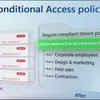
New Conditional Access policy plans in Microsoft Entra
Group related Conditional Access policies into policy plans and define users, apps and conditions once for every rule in the plan. Add a rule for each requirement, like phishing-resistant MFA or compliant devices, and keep the shared scope in one place. Build a plan around a user group, like headquarters staff, or a shared condition, like high agent risk, and start from templates. Merge existing policies into a plan with the migration tool. It pulls shared conditions up to the plan and turns each policy into a rule. Your current policies stay enforced until you cut over. Etan Basseri, Principal Product Manager, Microsoft Entra, shares how plans and rules fit together in the Microsoft Entra admin center. 👥 Who it's for: Identity and security admins who manage Conditional Access in Microsoft Entra, and architects planning how to organize or migrate large policy sets, including access controls for AI agents. ⏱️ Chapters: 00:00 Conditional Access policy plans in Microsoft Entra 00:48 Track policies beyond naming prefixes 01:29 How shared conditions and rules work 02:41 Create a policy plan for HQ users 03:43 Add a phishing-resistant MFA rule 04:43 Add a compliant device rule 05:51 Block high-risk AI agents in one plan 06:56 Migrate existing policies into a plan 08:11 Keep policies enforced until cutover What are Conditional Access policy plans? They organize access controls around an objective, either a persona like employees, external guests or administrators, or a security goal like requiring compliant devices or securing agent activity. Plan-level attributes cover identities, resources and applications, user actions and authentication context, plus shared conditions like risk levels, devices, network locations and client app types. Each rule layers its own conditions and grant or session controls on top. Plans live in a new Policy plans view, next to your existing policy list under Con
Podzilla Summary coming soon
Sign up to get notified when the full AI-powered summary is ready.
Free forever for up to 3 podcasts. No credit card required.
Listen to This Episode
More from Microsoft Mechanics Podcast
New Microsoft Copilot Harness | More power, token efficiency & control for agents in Foundry
Fight AI with AI | Multi-Agent Security Defense
Build Automated Agents, Workflows, and Apps - New in Copilot Studio
Create agents fast with Agent Builder in Copilot
Get summaries like this every morning.
Free AI-powered recaps of Microsoft Mechanics Podcast and your other favorite podcasts, delivered to your inbox.
Free forever for up to 3 podcasts. No credit card required.