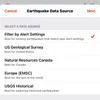
QuakeFeed v6.5.7 available now in the App Store. We fixed a bug in the Filter by Alert Settings feature. This episode gives a quick overview of this feature and how to adjust data source and filter settings in QuakeFeed. Links to "how to" videos also included below. Big thank you to the member of the QuakeFeed community who brought this bug to our attention! ⏱️ Timestamps 00:00 – QuakeFeed v6.5.7 00:32 – Filter by Alerts 00:59 – Step-by-step Instructions 01:36 – Data Source and Filters 01:47 – Alert Settings 02:20 – How to Send Support Request 📚 Learn More ▶️ How To Use the Earthquake Data Source and Filters (v6.1.0 and higher) https://www.youtube.com/watch?v=a6MWT_HMegM ▶️ How To Set-up Regional Alerts (v6.0.0 and higher) https://www.youtube.com/watch?v=IBW2_i6JUD8 ▶️ How To Set-up Nearby Alerts (v6.0.0 and higher) https://www.youtube.com/watch?v=EE6XSW_9NC0 📱 Download QuakeFeed for Real-Time Alerts Stay informed – get the QuakeFeed app now: https://apps.apple.com/app/quakefeed-earthquake-alerts/id403037266 Subscribe to QuakeFeed Premium <span styl
Podzilla Summary coming soon
Sign up to get notified when the full AI-powered summary is ready.
Free forever for up to 3 podcasts. No credit card required.
Listen to This Episode

Get summaries like this every morning.
Free AI-powered recaps of Earthquake! and your other favorite podcasts, delivered to your inbox.
Free forever for up to 3 podcasts. No credit card required.